Best Pomodoro App in 2026: 7 Options Compared
7 Pomodoro apps compared for 2026: exact pricing, real limits, and who each one (including our own) is actually best for.
Pomodorian is a free, AI-powered Pomodoro timer. No account required.
Try the timer→If you just want the short answer: Pomodorian is the best pick if you want a free Pomodoro timer with an AI planner that breaks your goals into sessions, no account and no paywall involved. It is not the right fit for everyone. Pick Forest if you need mobile gamification to stay off your phone, Toggl Track if you bill clients by the hour and want offline desktop tracking, or Focus To-Do if you want full project management bolted onto your timer. Here is how all seven options actually compare.
| You want... | Best pick |
|---|---|
| A free AI planner that breaks down tasks | Pomodorian |
| The simplest possible timer, nothing else | Pomofocus |
| Mobile gamification to stay off your phone | Forest |
| Full project management plus a timer | Focus To-Do |
| Billable hours with offline desktop tracking | Toggl Track |
New to the method itself, not just the tools? Start with our complete Pomodoro Technique guide.
How we compared these apps: Pomodorian is built and published by the author of this site. This comparison is based on each app's publicly available features and pricing, verified on July 27, 2026. No app paid for placement or ranking here.
1. Pomodorian: Best for Free AI-Powered Planning
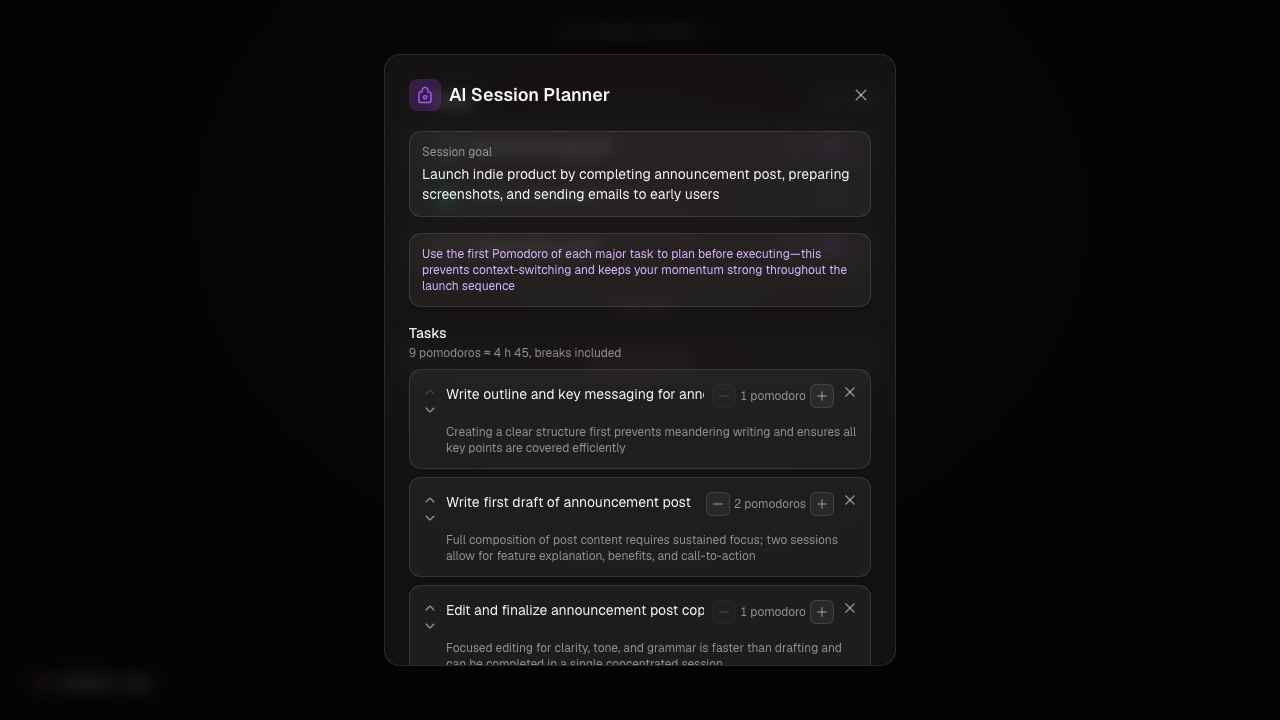
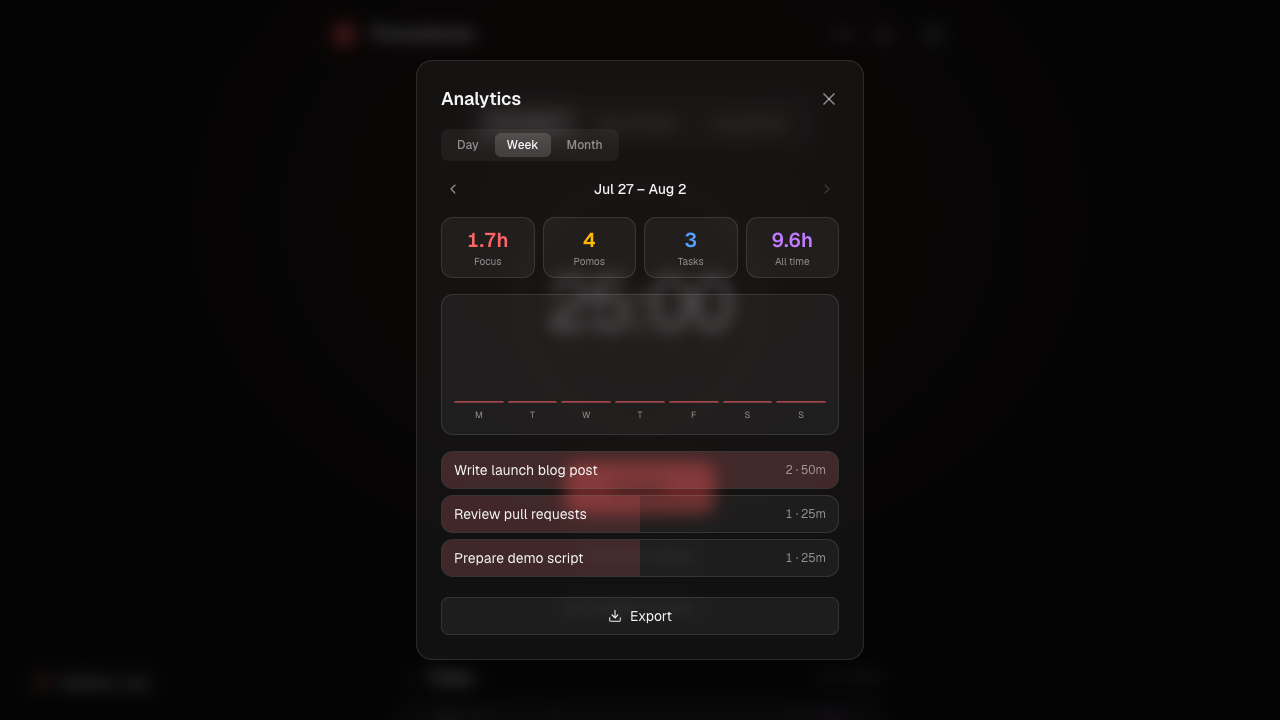
Pomodorian is a free, web-based Pomodoro timer built around an AI Session Planner: describe a goal in plain language and it returns an editable list of pomodoro-sized tasks with time estimates, powered by Claude and available in 8 languages. Everything else is free too: five layerable ambient sounds (rain, cafe, lo-fi, forest, fireplace), a GitHub-style focus heatmap, and a glassmorphism dark mode. All data stays in your browser's local storage. There is no account, no cloud sync, and no ads.
Limitations: Pomodorian is web-only. There are no native iOS or Android apps, no offline mode (it needs a connection to load, though a session already running keeps ticking if your signal drops mid-session), and no third-party integrations like Todoist or Google Calendar.
Choose it if: you want a modern, free timer with AI help breaking down tasks, and you don't need offline access or native mobile apps.
2. Pomofocus: Best for Bare-Bones Simplicity
Pomofocus is one of the most recognizable web Pomodoro timers. The free tier includes the timer, task list, activity reports, customizable ambient sounds, and a fullscreen mode, and it doesn't require signing up. It's installable as a PWA and the core timer works offline. The free tier does show ads; Premium removes them and adds multiple projects with productivity tracking, more saved templates, CSV report exports, Todoist import, and webhooks. Pomofocus's own pricing page returned an error when we checked it, but third-party trackers list Premium at around $3/month, roughly $18/year, or a $54 lifetime option. Treat that figure as indicative rather than official. Pomofocus is also available as a downloadable app for Mac, Windows, and Linux, and has no AI planning features. See our full Pomodorian vs Pomofocus comparison for a deeper look.
Limitations: ads on the free tier, no AI features, a dated interface.
Choose it if: you want the simplest possible timer and don't mind occasional ads.
3. Forest: Best for Mobile Gamification
Forest turns focus sessions into a game: start a timer and a virtual tree grows, leave the app and it dies. The free tier includes the focus timer, Deep Focus app blocking, Time Guard for one app, one soundscape ("Mindful Space"), tree species, and focus tracking, with no card required. Forest Plus, its subscription, unlocks every soundscape, multi-app Time Guard, detailed Focus Analytics, and real tree planting (up to 5 per account, via a partnership with Trees for the Future), at around $39.99/year (about $3.33/month) according to third-party trackers, with a 7-day free trial; Forest's own site doesn't publish an exact figure and says pricing varies by region and platform. Forest works fully offline (timer, tree growth, and stats all run without a signal), but it's mobile-only: iPhone, iPad, Android, Apple Watch, and Chrome/Firefox extensions, no desktop app. An account is only needed for multi-device sync. See how it stacks up in our Pomodorian vs Forest comparison.
Limitations: no desktop app, no AI features, most soundscapes are locked behind Plus.
Choose it if: you're motivated by gamification and mostly work from your phone.
4. Focus To-Do: Best for Full Task Management
Focus To-Do pairs a complete task manager (subtasks, due dates, projects, reminders) with a Pomodoro timer and basic white noise built in. According to its official App Store listing, Premium is available as a $1.99 subscription, a $3.99 three-month pass, or an $11.99 lifetime purchase, unlocking multi-device sync, more white noise options, detailed stats, custom themes, and unlimited project folders. It runs on Android, iPhone/iPad, Mac, Windows, and Apple Watch, plus a Chrome extension. Focus To-Do doesn't publish clear information on whether an account is required for the free tier or whether it works offline, so we're not going to guess. Compare it directly in our Pomodorian vs Focus To-Do writeup.
Limitations: a busier interface than a pure timer, no AI features.
Choose it if: you want one app for planning and executing, not just timing.
5. Toggl Track: Best for Billable Time and Offline Desktop
Toggl Track is a time-tracking tool first and a Pomodoro app second. The free tier (up to 5 users) includes unlimited time tracking, unlimited projects and clients, an autotracker, idle detection, calendar integration, 100+ integrations, and CSV/PDF export, with no card required. The Pomodoro timer itself lives in the browser extension, desktop app, and mobile app rather than the plain web app, with configurable break reminders and a Focus mode. Paid plans start with Starter at $9 per user per month billed annually, adding billable rates, project time estimates, and rounding; Premium runs $18 per user per month annually (Toggl was running a $14 first-year promotion at the time of writing), adding profitability tracking, forecasting, and Jira or Salesforce integrations. The desktop app for Mac and Windows works fully offline, storing time entries locally and syncing once you're back online. An account is required. See our Pomodorian vs Toggl Track comparison.
Limitations: not built as a Pomodoro app first, no AI features, overkill if all you want is a timer.
Choose it if: you need to bill hours and want offline tracking on desktop.
6. Focus Keeper: Best for the Apple Ecosystem
Focus Keeper is a native Pomodoro app built for Apple devices: iPhone (iOS 16+), iPad, Mac on Apple Silicon, Apple Watch, and Apple Vision, plus a web version at focuskeeper.co that requires an account. Two independent sources converge on Pro pricing of $3.99/month or $34.99/year (US pricing); other figures listed on its App Store page look like regional or legacy tiers we couldn't confirm, so we're leaving them out. Focus Keeper doesn't publish clear details on ambient sounds, offline support, or ads for its free tier.
Limitations: built around Apple devices, no AI features, thin public documentation on the free tier.
Choose it if: you live in the Apple ecosystem and want a native, polished app.
7. Reclaim.ai: Best for Calendar-Driven Scheduling (Not a Pomodoro Timer)
Reclaim.ai is worth including with a caveat: it's a Google or Outlook calendar add-on, not a Pomodoro app. Its "AI Agents" automatically block Focus Time, Habits, Buffer Time, and Smart Meetings on your existing calendar, and an AI Planner can be driven by chat through ChatGPT, Claude MCP, or Microsoft Copilot integrations. That's scheduling around commitments you already have, not the goal-to-pomodoro breakdown Pomodorian's planner does. The free "Lite" tier covers one user and a one-week planning horizon. Starter costs $10 to $12 per seat monthly (up to 10 users, 8-week horizon); Business, the most popular tier, runs $15 to $18 per seat monthly (up to 100 users, 12-week horizon); Enterprise runs around $22 per seat monthly, adding SSO and org-wide analytics. An account through Google or Microsoft is mandatory, and there's no ambient sound or offline concept since it isn't a timer at all.
Limitations: requires full calendar access, per-seat cost adds up for teams, not a Pomodoro timer in the traditional sense.
Choose it if: your day is ruled by meetings and you want AI defending focus blocks on your calendar automatically.
Where Another App Clearly Wins
Pomodorian isn't the right tool for every job. Three cases where a competitor genuinely does more:
- Mobile gamification. Forest's tree-dies-if-you-leave mechanic and social tree-planting build a stronger anti-phone habit loop than any timer with a plain analytics dashboard, Pomodorian included.
- All-in-one project management. Focus To-Do's subtasks, due dates, and multi-device sync handle ongoing project work that a session-based planner like Pomodorian's was never built for.
- Billable hours and offline desktop work. Toggl Track's client and project reporting, plus a fully offline desktop app, are built for freelancers who need to invoice, not just focus.
Comparison Table
| App | AI Planning | Ambient Sounds | Offline | Price | Account required |
|---|---|---|---|---|---|
| Pomodorian | Yes | Yes (5, free) | No | Free | No |
| Pomofocus | No | Yes (free tier) | Yes (PWA) | Free; Premium ~$3/mo* | No (basic use) |
| Forest | No | Partial (1 free) | Yes | Free; Plus ~$3.33/mo* | No (yes for sync) |
| Focus To-Do | No | Partial (white noise) | Not disclosed | Free; Premium from $1.99 | Not disclosed |
| Toggl Track | No | Not found | Yes (desktop) | Free (5 users); Starter $9/user/mo | Yes |
| Focus Keeper | No | Not disclosed | Not disclosed | Free; Pro $3.99/mo | Yes (web) |
| Reclaim.ai | Yes (calendar AI) | N/A | N/A | Free (Lite); Starter from $10/seat/mo | Yes |
*Pomofocus's and Forest's premium prices come from third-party trackers, not each app's own site: Pomofocus's official pricing page was unreachable at verification time, and Forest's site declines to publish an exact figure, saying only that pricing varies by region and platform.
Key Takeaways
- Pomodorian is the only app here that's completely free with no account, no ads, and a built-in AI planner, but it has no offline mode and no native apps.
- Pomofocus is the simplest pure timer; its premium pricing (around $3/month) comes from third-party trackers, not from Pomofocus's own site.
- Forest is the strongest choice for mobile gamification and works fully offline, but it has no desktop app.
- Toggl Track and Focus To-Do beat Pomodorian on task and time-management depth, at the cost of a more complex interface.
- Reclaim.ai isn't a Pomodoro app at all: it's an AI calendar assistant worth considering only if meetings, not timers, are your real problem.
Frequently Asked Questions
What is the best free Pomodoro app in 2026?
Pomodorian is the most fully-featured free option: an AI session planner, five ambient sounds, and analytics, all without an account or paywall. Pomofocus and Toggl Track also have usable free tiers, though Pomofocus shows ads and Toggl's free plan is really a time-tracking tool with a Pomodoro mode attached.
Does Pomodorian work offline?
No. Pomodorian needs a connection to load, and there's currently no offline mode or service worker. A pomodoro that's already running will keep counting down if your signal drops briefly, but you can't start a fresh session offline. If offline use matters to you, Forest, Pomofocus as an installed PWA, or Toggl Track's desktop app are better fits.
Which Pomodoro app has AI features?
Pomodorian's AI Session Planner turns a written goal into a list of pomodoro-sized tasks with time estimates. Reclaim.ai also uses AI, but for a different job: it auto-schedules focus time, habits, and meetings on your calendar rather than breaking down a specific task list.
Is Forest or Pomodorian better for staying off my phone?
Forest, if your phone is the main distraction: its tree dies if you leave the app, a stronger deterrent than any dashboard can offer. Pomodorian is browser-based and doesn't have that mobile-specific mechanic, so it fits desktop-first work like coding or writing better.
Do any of these apps require a paid plan to be useful?
No. Pomodorian, Pomofocus, Forest, Focus To-Do, and Toggl Track all have usable free tiers for solo use. Paid plans mainly add sync across devices, detailed reports, or team features rather than gating the core timer.
Sources
- pomofocus.io/
- www.trustradius.com/products/pomofocus/pricing
- www.indiehackers.com/product/pomofocus/earned-first-100-from…
- www.pwalist.app/app/pomofocus
- www.forestapp.cc/
- apps.apple.com/us/app/focus-to-do-focus-timer-tasks/id966057…
- www.focustodo.cn/
- toggl.com/track/pricing/
- support.toggl.com/en/articles/2220695-can-toggl-track-work-o…
- apps.apple.com/gb/app/focus-keeper-pomodoro-timer/id86737491…
- focuskeeper.co/blog/focus-timer-subscription-pricing-and-pla…
- focuskeeper.co/
- reclaim.ai/pricing
- reclaim.ai/
- schedulingkit.com/pricing-guides/reclaim-ai-pricing
Ready to focus smarter?
Try Pomodorian, the AI-powered Pomodoro timer. Free, no account required.
Start Focusing